
Skip to content
(808) 778-3166Talk to us
Menu

A booking site and one dashboard to run your rental business.

Renters book and pay on your own site. Phone and walk-in bookings go on the same calendar. We set it up and help you grow.

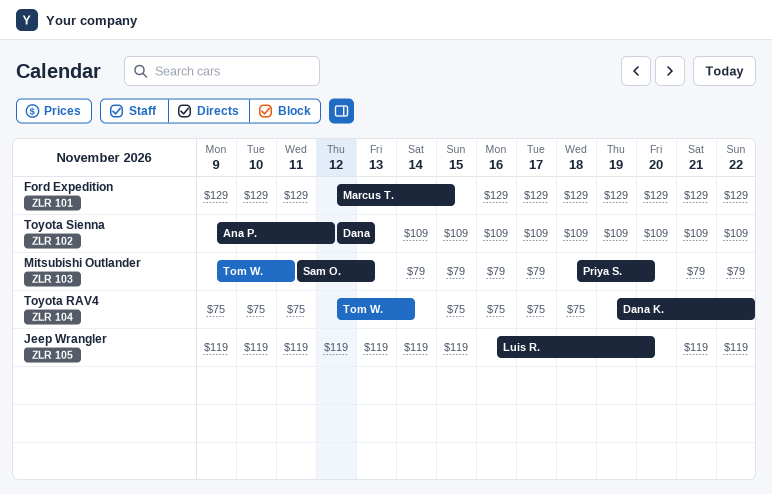
A fleet calendar with direct and staff bookings for each car across two weeks. Over it, two bookings: Marcus T.'s Ford Expedition, booked on the booking site and paid by card, and Tom W.'s Toyota RAV4, added by phone with its payment recorded.

Your fleet calendar, with one booking from your site and one added by phone.

You already run the business. The gap is the systems behind it.

Running every car's status from memory works until you are sick or unavailable. Then the fleet stops with you.

On the left, the day kept as notes and texts: a car back at 8 that needs a wash before a 2:00 pickup, a child seat for a 9:00 pickup, a phone payment, and a return at 4. On the right, the same day on a daily board: each return and pickup in time order, with its car, renter, and tags.

Without reports, you can't see which cars earned the least last month.

Revenue by car, date, weekday, and hour, by source.

Finally, I have my own brand and direct customer relationships.

NathanFleet owner, 45 vehicles

A booking site your renters will use on their phones

  • We build your booking site on your own domain.
  • Built to turn visits into bookings, with one-page checkout and a Continue button that stays in view on phones.
  • Multi-language sites: we set up versions in the languages your renters speak.

A booking site for an example business on its own domain, yourcompany.com. On a laptop, a date search shows the cars free on those dates with their daily prices. On a phone, a car page shows the car, its price, and its details, with the Continue button fixed at the bottom of the screen.

Online, phone, and walk-⁠in bookings on one calendar

Once a car is bookable in more than one place, you need one calendar that knows every reservation.

Two lanes merge into one fleet calendar. Online: the renter picks dates, sees the full price, and pays on your site, and the booking is tagged Direct. Phone or walk-in: the renter calls or walks in, you add the booking and record cash or other payments, and it is tagged Staff. The calendar shows both kinds of booking on three cars across a week. After a booking is made, the agreement is sent for e-signature, the renter sends license and insurance photos, you can place a deposit hold from your dashboard, the pickup is listed for its day on the daily board, and the car's status is tracked after its return.

  1. Renters book online

    Date search shows only free cars, and renters see the full itemized total before they pay on your site.

  2. Phone and walk-in bookings

    Take bookings over the phone or at the counter in your dashboard, and record cash or other payments against each one.

  3. Both land on one calendar

    Direct, Turo, and phone bookings and blocks share one fleet calendar.

  4. Paperwork follows the booking

    Renters send license and insurance photos from their phone before pickup. You place a deposit hold from your dashboard, then capture or release it.

  5. Then onto your daily board

    Each pickup lands on that day's board.

If you also list on Turo, see how Turo trips reach your calendar.

Run today's pickups and returns from one dashboard

Every booking, payment, and car in one place, for you and your staff.

Car rental management software
Dashboard views

Today's and this month's bookings, fleet utilization, and what is still owed on today's pickups.

The dashboard overview: today's and this month's bookings and booked value, how much of the fleet is on rent, where today's bookings came from, and what is still owed at today's pickups.

Pickups and returns with notes, extras, deposits, and tags such as “Returned / Dirty”.

Daily board for a Thursday: returns and pickups with times, plates, extras, and notes. One returned car is tagged Returned / Dirty and a child seat is checked off.

The day's returns and pickups on one board, with tags set and extras checked off.

  1. The board lists the day's returns and pickups, each with its time, car, extras, and notes.
  2. One click opens the next day.
  3. A returned car is tagged "Returned / Dirty".
  4. The child seat for a pickup is checked off.

Give staff their own logins, with two-factor sign-in.

Staff logins: three users with their roles, each with two-factor sign-in on.

The phone and walk-in bookings from step 2, as your staff enter them.

A phone booking in the staff booking form: the calculated price switched off, the total agreed on the phone typed in, and the subtotal, each tax, and the service charge worked out from it.

A phone booking, entered by staff.

  1. Staff switch off the calculated price.
  2. Staff type the total agreed on the phone.
  3. The subtotal, each tax, and the service charge are worked out from it.

Your site offers pickup and return times only inside the hours you set

Staff can still book past a closure, and it is recorded.

Your setting

The weekday hours table: pickup and return hours for each day, with Sunday closed for pickups.

What renters can book

  • Set pickup hours and return hours separately for each day of the week.
  • Close the fleet for pickups and still accept returns, on the dates or weekdays you choose.
  • Pause same-day bookings with one switch. Later dates keep booking.
Isaiah Harris

Zilarent started as Blue Diamond Vacations' booking system

My company still runs on it.

Isaiah Harris, founder of Zilarent and owner of Blue Diamond Vacations.

Blue Diamond Vacations runs 21 active rental cars as of October 2026.

Built by our own engineers, not outsourced.

New in Zilarent

  1. Keep a do-not-rent list.
  2. Run the daily board from your phone.

Read the changelogMore about Isaiah

Set your own booking fee and keep more of every booking

Show renters a booking fee at checkout, as Turo, Avis, and Budget do. Set it above 6.4% and you keep more than the rental itself.

  1. Renter pays on your site$418.00
  2. Stripe processes the card
  3. Paid straight to your own Stripe account

With a 10% booking fee

One example four-day booking.

Rental: rate, delivery, extras$380.00
Renter booking fee, 10%$38.00
Renter pays$418.00
Zilarent fee, 6% of $418.00minus $25.08
You keep$392.92
$12.92 above the rental, about 3.4%. Gross bookings, before the costs of running the car. Not on this receipt: Stripe card fees and insurance.

Zilarent

$299a monthplus6%booking fee on everything the renter pays

  • What you pay buys the booking site and dashboard, our team's setup, and our help after launch.
  • A one-time setup fee, quoted on your call.
  • You can add a booking fee for the renter at checkout. $0 per booking out of your pocket when your renter booking fee is 6.4% or more, plus Stripe card fees.
  • If you pass it on, check your state's rules: some states, California among them, require advertised prices to include mandatory fees.
  • Month-to-month plans, no long-term contract required.
See full pricing

Some rental software charges by fleet size, so the bill rises as you add cars. Zilarent charges a flat monthly fee plus a percentage of each booking, so the bill rises with bookings.

To compare your options, read our guide to the best car rental software for small fleets.

We help with insurance, branding, your Google profile, and growing your rental business, even if you're starting out

  • Insurance

    As part of setup, we introduce you to insurance providers we work with: companies that cover car rental businesses. Zilarent is not an insurer.

    Read our guide to car rental business insurance.

  • Your brand

    We build your site in your brand, or help you create a simple one: colors, copy, and a logo.

  • Your Google profile

    We walk you through setting up your Google Business Profile and how to get reviews.

  • Growing

    Call us any time for advice on growing your rental business.

Starting out

Live in as little as 2 days once we have your details.

The software and the website are the fast part. Insurance and business registration set the real timeline, so start them the same week we start your site.

  1. You send us your details.
  2. We build your site.
  3. You go live.

We do

  • Your own rental agreement, set up for e-signature
  • Branded booking emails from your own domain
  • Rules for last-minute trips, set up with you
  • Google Analytics and tag manager, connected so paid bookings report as sales
  • Terms and privacy pages at launch

You do

  • Connect your Stripe account
  • Line up commercial insurance
  • Register your business
  • Have your attorney review your rental agreement

What we need from you

  • Your Turo listing links, or a list of your cars with your photos
  • Your logo and colors, or a go-ahead for us to make a simple set
  • The domain you want to use
  • Your Stripe account
  • Your rental agreement
  • Your pickup spots and hours

Questions rental businesses ask

Is there a minimum fleet size?

No. There is no minimum fleet size. Most businesses on Zilarent run 10 or more cars. A single personal car, rented out now and then, belongs on a marketplace.

Can I still take phone bookings?

Yes. You or your staff add them in the dashboard, beside your online bookings.

Do I need to be technical?

No. Our team does the setup. After launch, you edit homepage words and photos, featured cars, reviews, FAQs, and email wording yourself.

What happens after the call?

If you go ahead, our team takes it from there. You send us your details, and we build your site in your brand. You see it first on a private preview link, and you connect your own Stripe account.

What if I also list on Turo?

Turo trips arrive in Zilarent automatically, and the car is hidden on your site for those dates. When you take a direct booking, you block those dates in Turo.

Do I need commercial insurance?

Yes. Many personal auto policies don't cover renting your car out for money. A claim is the worst time to find that out. Get commercial coverage before your first direct booking.

Who will I deal with?

Isaiah takes your first call. After that, our team sets up your site and is your main contact. Same-day replies on business days.

I already use rental software. Can I switch?

On the call, Isaiah will go through what moves over and what doesn't before you decide.

Bring your fleet size and your current booking setup.

Talk to us about your fleet.

We'll call you within one business day.

To talk now, call us at (808) 778-3166.

What the call covers

  • Your fleet: your cars, your rates, and how you rent today.
  • Your current setup: how bookings, payments, and agreements run today, and what you want to keep.
  • Your plan: where more direct bookings will come from, insurance, what it costs, and how soon you could be live.
  • A walkthrough of the booking site your renters use and the dashboard you run it from.

The setup was incredibly smooth. They handled everything from my website to rental agreements. I was live in under a week.

KaluaFleet owner

Live in as little as 2 days once we have your details:

  • Your Turo listing links, or a list of your cars with your photos
  • Your logo and colors, or a go-ahead for us to make a simple set
  • The domain you want to use
  • Your Stripe account
  • Your rental agreement
  • Your pickup spots and hours

Step 1 of 2

About your cars

How do you rent cars today?
How many cars?

Paste it and we can look at your cars before we call.

Step 2 of 2

Where to call you

We'll call this number about your request.

We use your details to set up your call. Privacy policy