Skip to content
(808) 778-3166Talk to us
Menu

Car rental reservation system for your own fleet, set up by our team

Renters reserve a car on your own site, pay, and get confirmed on the spot. Phone bookings and Turo trips go on the same calendar in your dashboard.

The top of a car page on a booking site: the photo and name of a white 2025 Porsche 718 Boxster.
The quote on a car page of Blue Diamond Vacations' booking site: the return date, the long-trip discount struck through, and the 3-day rental price.
A page for every car, under your company's name.

Running reservations on a spreadsheet doesn't scale

Across Turo, a phone line, and a group chat, the same Tuesday gets promised twice and a deposit never gets collected.

Our car rental reservation system records each online booking the moment the renter pays, as the booking side of our car rental software built for independent fleets.

What each one does with a booking
TaskSpreadsheet, phone calls, or Turo aloneZilarent
Online bookingsThrough Turo onlyOn your own site, paid by card
Turo tripsTyped in by handArrive automatically and hide the car on your site for those dates
Phone bookingsA separate logEntered in your dashboard alongside online bookings and Turo trips
DepositsChased by handA hold you place from your dashboard
AgreementsPaperYour own agreement, sent for e-signature after each direct or phone booking (we set it up)
Fleet utilizationWorked out by handIn your dashboard overview

If you're comparing other rental software, start with our guide to the best car rental software for small fleets.

The life of a booking, from date search to return

One example booking, screen by screen

  1. Search

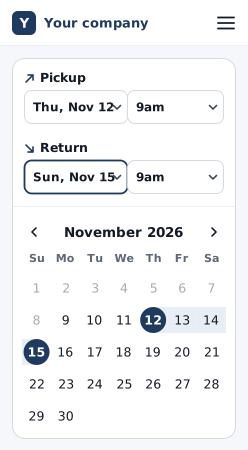
    The renter picks dates and sees only the cars that are free.

    A booking site on a phone, in a rental business's own brand: pickup and return dates and times, with the calendar open on November and the three days between them marked.
  2. Price

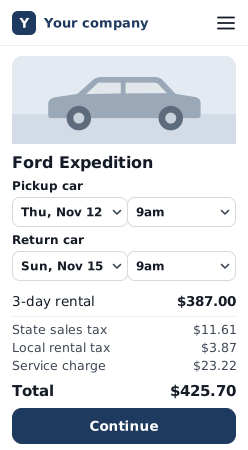
    The quote lists the rental, discounts, delivery, each tax, and any service charge, then the full total.

    A car page on a phone, in a rental business's own brand: the pickup and return dates, then a 3-day rental, each tax, the service charge, the total, and Continue.
  3. Pay

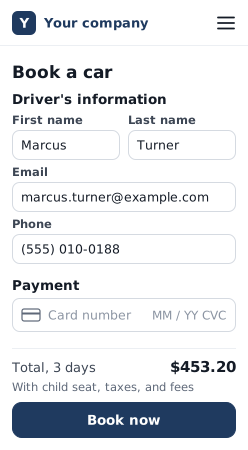
    The renter pays by card on one page, without creating an account, and gets instant confirmation. Paid straight to your own Stripe account.

    The one-page checkout on a phone, in a rental business's own brand: the driver's name, email, and phone, an empty card field, the total, and Book now.
  4. Paperwork

    Your own rental agreement goes out for e-signature after the booking. We set it up. Before pickup, the renter sends license and insurance photos from their phone.

    Where it's switched on, Stripe checks the license is genuine.

  5. Pickup

    The renter gets a pickup reminder email, and the pickup shows on your daily board.

  6. Return

    When the car comes back, you mark it returned on the daily board. Then you capture part of the deposit hold or release it.

    If you change a booking for the renter, it is re-priced at its original rates. The renter confirms the new price before any charge.

Your booking site and the dashboard behind it

Your dashboard takes phone bookings and keeps the renter's card on file

  • Phone and walk-in bookings with cash or other payments recorded.
  • The card saved for later charges.
  • Search bookings by name, phone, booking number, or Turo reference.
  • You handle deposit holds and booking changes here too, as step 6 shows.
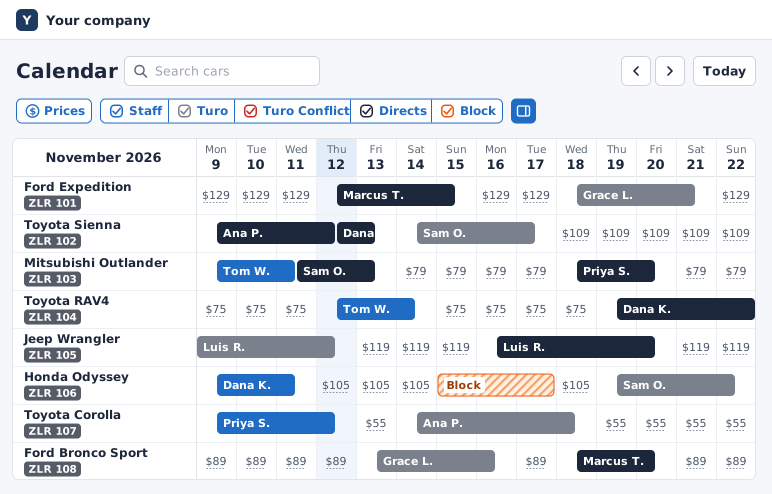
Fleet calendar: direct, Turo, and phone bookings for each car across two weeks, prices on the free days, and one block-off.
Direct, Turo, and phone bookings on one fleet calendar.

See more of the dashboard on our car rental management software page.

Renters see your discounts, extras, and pickup fees as they book

  • Your own booking site on your own domain, built for you.
  • A page per car with photos, specs, and a live price.
  • Weekend, seasonal, and long-trip pricing with the discount struck through.
  • Extras at checkout, with quantity limits you set, on the cars you choose.
  • Airport, hotel, and resort pickup spots with their own fees.
  • Promo codes that expire and cap themselves.
  • Local taxes itemized and frozen per booking.
  • On a phone, the Continue button stays on screen.

Your site is built on our car rental website builder.

Car page quote before the return date changes: a three-day rental, each tax, the service charge, and the total.

The renter sees the itemized total, each tax included, before paying.

  1. The renter changes the return date on the car page.
  2. The price updates on the page: the rental, each tax, the service charge, and the total.

Online bookings follow your hours and closures

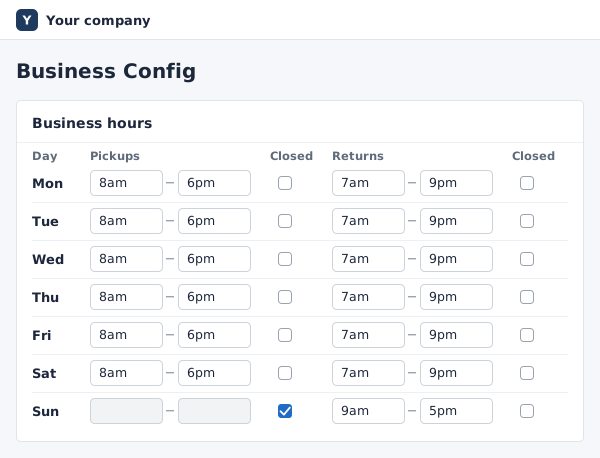
Hours example: pickups 8am to 6pm Monday to Saturday and closed on Sunday. Returns 7am to 9pm Monday to Saturday and 9am to 5pm on Sunday. Thursday, November 19 is closed for pickups with returns open. On the booking site's date picker, November 19 is grayed out for pickup and open for return.

  • LimitsBusiness hours, minimum notice, and trip-length limits enforced.
  • Pickup and return hoursSet pickup hours and return hours separately for each day of the week. On Turo, one window covers pickups and returns (as of 2026).
  • ClosuresClose the fleet for pickups and still accept returns, on the dates or weekdays you choose. Turo can't do this, and most tools built for Turo hosts don't offer it either (as of 2026).
  • One rule setSearch, car pages, quotes, and checkout all follow the same rules.
The weekday hours table: pickup and return hours for each day, with Sunday closed for pickups.
Pickup hours and return hours, set for each day of the week.

Hours and closures cover the whole fleet and apply to online bookings. Staff can still book past a closure, and it is recorded.

Last-minute trips

Set rules for last-minute trips: allow short ones at a higher rate, or turn them down. We set the rules up with you.

Rule example
1-⁠day trip2 days or longer
Starts within 7 daysAllowed at a higher rate (50% more)Normal price
Starts laterTurned down: the usual 2-⁠day minimum appliesNormal price

For Turo hosts and independent rental car companies

No minimum fleet size. Most businesses on Zilarent run 10 or more cars.

For Turo hosts

Keep Turo running and add your own booking site beside it. It's for renters who want to book with your business.

See how it works for Turo hosts

For rental businesses

If you track bookings in spreadsheets or older rental software, bring your current setup to the call. We'll go through what moves over and what doesn't before you decide.

See how it works for rental businesses

Where one 200+ car fleet's bookings come from

We increased our revenue by about 50% through our Zilarent website in 2025 while still running Turo. Having our own booking website changed everything.

ShilohFleet owner, 200+ vehicles

Every number below is based on gross bookings, not profit: what renters paid before financing, insurance, cleaning, maintenance, and card processing.

One business on Zilarent

About 40% of its gross bookings from January to June 2026 came from its own site and by phone, and the rest from Turo.

That 40% is up from about 32% in the six months before, from July to December 2025.

Your numbers depend on your market, cars, and prices. On the call, we'll tell you what is realistic for your fleet.

Other businesses on Zilarent booked from about $6,000 to $106,000 in gross bookings over 30 days.

What it costs

You get your own booking site, the dashboard, and a team that sets it up with you.

After launch, you can call us any time for advice on growing your rental business.

$299a month plus6%booking fee

On everything the renter pays.

  • You can add a booking fee for the renter at checkout. $0 per booking out of your pocket when your renter booking fee is 6.4% or more, plus Stripe card fees.
  • If you add a renter booking fee, check your state's rules: some states, California among them, require advertised prices to include mandatory fees.
  • There's also a one-time setup fee, quoted on your call.

Car rental reservation system: common questions

Does this rental car booking software work if I'm still active on Turo?

Yes. Turo trips arrive in Zilarent automatically, and the car is hidden on your site for those dates. When you take a direct booking, you block those dates in Turo. If a Turo trip lands on a car that's already booked, we email you both bookings within minutes. Turo guests stay on Turo. Zilarent never emails them.

Can I still take bookings over the phone?

Yes. You add phone and walk-in bookings from your dashboard, with cash or other payments recorded. They go on the same calendar as your online bookings. If the car is also on Turo, block those dates in Turo.

How does the system handle deposits and the rental agreement?

You place a deposit hold from your dashboard, then capture part of it or release it. Your own rental agreement is sent for e-signature after each direct or phone booking, and again after changes. We set it up. Before pickup, renters also send license and insurance photos from their phone.

What does a car rental reservation system like this cost?

$299 a month, plus a 6% booking fee on everything the renter pays: the daily rate, extras, delivery, all of it. A one-time setup fee is quoted on your call. Once your Zilarent bookings pass $1M over the past 12 months, the $299 monthly fee is waived and your booking fee drops from 6% to 5%. Turo bookings do not count toward the $1M. See full pricing for how the fee works.

How fast can I get a reservation system live?

Live in as little as 2 days once we have your details.

  • Your Turo listing links, or a list of your cars with your photos
  • Your logo and colors, or a go-ahead for us to make a simple set
  • The domain you want to use
  • Your Stripe account
  • Your rental agreement
  • Your pickup spots and hours

After your first call with Isaiah Harris, our team sets up your site and is your main contact. The software and the website are the fast part. Insurance and business registration set the real timeline, so start them the same week we start your site.

Do I need commercial insurance for direct bookings?

Yes. Many personal auto policies exclude renting your car out for money, and discovering that during a claim is the worst possible time. A Turo trip stays covered, but a direct booking on the same car carries no Turo coverage. Arrange commercial coverage before your first direct booking. As part of setup, we introduce you to insurance providers we work with: companies that cover car rental businesses. Zilarent is not an insurer. Confirm every detail of your coverage with a licensed provider.

Bring your car count and your current setup.

Talk to us about your fleet.

We'll call you within one business day.

To talk now, call us at (808) 778-3166.

What the call covers

  • Your fleet: your cars, your rates, and how you rent today.
  • Your Turo setup: what stays on Turo, and how Turo trips and direct bookings sit side by side.
  • Your plan to go direct: where renters will come from, insurance, what it costs, and how soon you could be live.
  • A walkthrough of the booking site your renters use and the dashboard you run it from.

The setup was incredibly smooth. They handled everything from my website to rental agreements. I was live in under a week.

KaluaFleet owner

Live in as little as 2 days once we have your details:

  • Your Turo listing links, or a list of your cars with your photos
  • Your logo and colors, or a go-ahead for us to make a simple set
  • The domain you want to use
  • Your Stripe account
  • Your rental agreement
  • Your pickup spots and hours

Step 1 of 2

About your cars

How do you rent cars today?
How many cars?

Paste it and we can look at your cars before we call.

Step 2 of 2

Where to call you

We'll call this number about your request.

We use your details to set up your call. Privacy policy