Skip to content
(808) 778-3166Talk to us
Menu

Car rental management software for Turo hosts and independent fleets

Run the whole fleet from one dashboard, with direct, Turo, and phone bookings on the same calendar. We set it up with you.

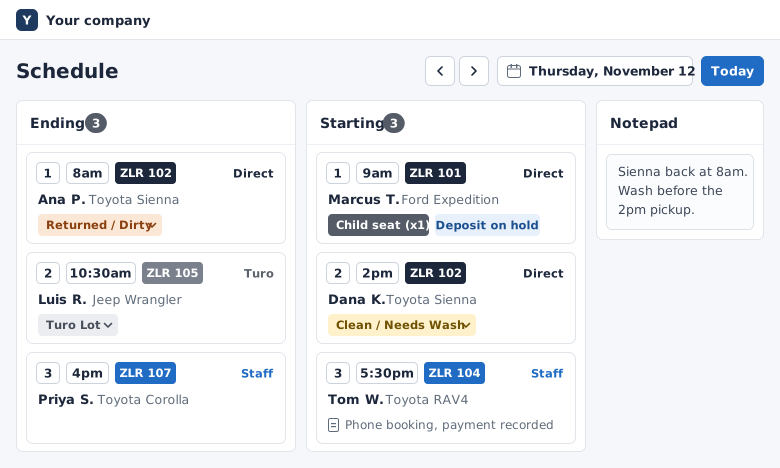
Daily board for a Thursday: returns and pickups, each numbered with its time, plate, and extras, and the Notepad. One returned car is tagged Returned / Dirty.
Your daily board on a computer, and on your phone.

A growing fleet needs more than memory

Running every car's status from memory works until you are sick or unavailable. Then the fleet stops with you.

Turo

Once you take direct bookings beside Turo, each car's schedule lives in two places. The only thing between you and a double booking is remembering to block the dates.

Turo runs the trip itself well: listing, booking, payout. Turo's tools know what happens on Turo, and nothing about a phone booking, your own site, or the car at the shop.

  • A spreadsheet

    The schedule, as of the last time someone typed it in.

    Zilarent

    One fleet calendar with direct, Turo, and phone bookings and blocks, with price changes by date.

  • A group text

    Who picks up which car today, somewhere in the thread.

    Zilarent

    A daily board of pickups and returns with notes, extras, deposits, and tags such as “Returned / Dirty”.

Close for pickups and keep taking returns, on the days you choose

Set the hours your team can staff, and your site follows them.

  1. Pickup hours

    Start with pickup hours: Monday to Saturday, 8am to 6pm.

  2. Return hours

    Set pickup hours and return hours separately for each day of the week.

  3. A weekday off

    Close Sundays for pickups, and keep Sunday returns open.

  4. One date off

    Close one date for pickups only. Returns that day still come in.

    Turo can't do this, and most tools built for Turo hosts don't offer it either (as of 2026).

  5. What renters see

    On your booking site, the date picker grays out that date for pickup and keeps it open for return.

Hours example: pickups 8am to 6pm Monday to Saturday and closed on Sunday. Returns 7am to 9pm Monday to Saturday and 9am to 5pm on Sunday. Thursday, November 19 is closed for pickups with returns open. On the booking site's date picker, November 19 is grayed out for pickup and open for return.

One example week, built up step by step

Hours and closures cover the whole fleet and apply to online bookings. Staff can still book past a closure, and it is recorded.

Stop direct-booking returns on a day you can't check cars in, and keep pickups open.

Source: Turo's help page on availability, read in 2026. This is our own site, so check our claims against the sources we link.

  • Last-minute trips at a higher rate, or turned down

    Set rules for last-minute trips: allow short ones at a higher rate, or turn them down. We set the rules up with you.

    Rule example
    1-⁠day trip2 days or longer
    Starts within 7 daysAllowed at a higher rate (50% more)Normal price
    Starts laterTurned down: the usual 2-⁠day minimum appliesNormal price
  • Search, car pages, quotes, and checkout all follow the same rules

    1. Search
    2. Car page
    3. Quote
    4. Checkout
  • Your hours, in your dashboard

    The weekday hours table: pickup and return hours for each day, with Sunday closed for pickups.
    Pickup hours and return hours, set for each day of the week.

What goes out today and what needs cleaning

When you can no longer answer “what goes out tomorrow?” without checking the Turo app, a notebook, and a text thread, the fleet has outgrown memory.

Daily board for a Thursday: returns and pickups with times, plates, extras, and notes. One returned car is tagged Returned / Dirty and a child seat is checked off.

The day's returns and pickups on one board, with tags set and extras checked off.

  1. The board lists the day's returns and pickups, each with its time, car, extras, and notes.
  2. One click opens the next day.
  3. A returned car is tagged "Returned / Dirty".
  4. The child seat for a pickup is checked off.
  • Today at a glanceOne overview of today's and this month's bookings, fleet utilization, where today's bookings came from, and what is still owed on today's pickups.
A dialog that blocks several cars at once: three cars ticked, one date range, one reason, and Save.
Block several cars and dates in one step, with one reason.
  • Time between tripsThe window between trips caps how many bookings a car can take in a month. Set a turnaround time per car and a gap between trips.
  • BlocksBlock one car or close the fleet. Block a car going in for brakes before a renter books it.

The board and the calendar are the day-to-day side of our car rental software platform.

Deposits, changes, and refunds from the dashboard

Place a deposit hold from your dashboard, then capture or release it.

The card is saved at checkout. Shortly before pickup, staff place a $500 hold from the dashboard, because a hold lasts about a week. After the return, if there is damage, staff capture part of the hold and the rest is released. If not, staff release the hold.

A booking in the dashboard: a deposit hold placed, with Capture and Release Hold beside it, then the renter, car, dates, total, pickup and return, and a child seat.
One booking, with the deposit hold you place from the dashboard.
The refund dialog for a booking: the amount paid, the refund amount, the card fee Stripe kept already filled in as the handling fee, and the net refund.
A refund, with the card fee already filled in.
  • Changes re-priced, with the difference charged or refunded.
  • A changed booking keeps its original rates, and the renter confirms any price change.
  • Full or partial refunds.
  • One payment ledger.

See direct, Turo, and phone revenue side by side

A platform payout total says the fleet earned money. Per-⁠vehicle numbers say which cars earned it.

Revenue for four cars over 30 days. By source: direct $5,500, Turo $4,630, phone $940. By car: Ford Expedition $3,710, Jeep Wrangler $3,080, Toyota Sienna $2,640, Mitsubishi Outlander $1,640.

Revenue by car, date, weekday, and hour, by source.

A pause switch for short-⁠staffed days

Same-day bookings switched off for today in the dashboard. On the booking site, a pickup today shows that online bookings are paused, with the next available pickup tomorrow at 8am.

Pause same-day bookings with one switch. Later dates keep booking.

  1. Staff pause online bookings that would start or end today, and confirm.
  2. On the renter site, a pickup tomorrow still gets a normal quote.
  3. A pickup today shows that online bookings are paused, with the next available pickup time.
  • Booking alerts to up to ten addresses

  • Staff logins with two-factor sign-in

  • A do-not-rent list, checked on every online and phone booking

Run it beside Turo, or with no Turo at all

For Turo hosts

If you host on Turo, this rental car management software runs beside it. Turo trips land on your calendar within minutes of Turo's email. Renters who find you book with your business on your own site.

See how it works for Turo hosts adding direct bookings.

For rental businesses

If you run on a spreadsheet and a payment app, you get one dashboard and your own booking site. Phone and walk-in bookings go on the same calendar as online ones, with cash or other payments recorded.

See how it works for independent rental car companies.

Where one 200+ car fleet's bookings come from

We increased our revenue by about 50% through our Zilarent website in 2025 while still running Turo. Having our own booking website changed everything.

ShilohFleet owner, 200+ vehicles

Every number below is based on gross bookings, not profit: what renters paid before financing, insurance, cleaning, maintenance, and card processing.

One business on Zilarent

About 40% of its gross bookings from January to June 2026 came from its own site and by phone, and the rest from Turo.

That 40% is up from about 32% in the six months before, from July to December 2025.

Your numbers depend on your market, cars, and prices. On the call, we'll tell you what is realistic for your fleet.

What it costs to go live

After launch, you can call us any time for advice on growing your rental business.

Live in as little as 2 days once we have your details.

The software and the website are the fast part. If you're new to direct rentals, insurance, and business registration set the real timeline. Start them the same week we start your site.

What we need from you

  • Your Turo listing links, or a list of your cars with your photos
  • Your logo and colors, or a go-ahead for us to make a simple set
  • The domain you want to use
  • Your Stripe account
  • Your rental agreement
  • Your pickup spots and hours

$299a month plus6%booking fee

On everything the renter pays.

  • A one-time setup fee, quoted on your call.
  • You can add a booking fee for the renter at checkout. $0 per booking out of your pocket when your renter booking fee is 6.4% or more, plus Stripe card fees.
  • If you add a renter booking fee, check your state's rules: some states, California among them, require advertised prices to include mandatory fees.

Car rental management software: common questions

What does Zilarent's car rental management software include?

Our team sets up your booking site on your own domain, and the dashboard behind it. The dashboard has one calendar for direct, Turo, and phone bookings, and a daily board of pickups and returns. From it, you place deposit holds, give full or partial refunds, and see revenue by car. Renters send license and insurance photos before pickup. Your own rental agreement goes out for e-signature after each direct or phone booking.

Do I have to leave Turo?

No. Keep your Turo listings earning and take direct bookings beside them. Turo trips arrive in Zilarent automatically, and the car is hidden on your site for those dates. When you take a direct booking, you block those dates in Turo. If a Turo trip lands on a car that's already booked, we email you both bookings within minutes.

Who will I deal with?

Isaiah Harris, our founder, takes your first call. After that, our team sets up your site and is your main contact. Same-day replies on business days.

What does it cost?

$299 a month and a 6% booking fee, plus a one-time setup fee quoted on your call. The pricing page shows how the fee works.

Can I take phone bookings and run more than one location?

Yes to phone bookings: they go on the same calendar as your online ones. For more than one location, you can offer airport, hotel, and resort pickup spots with their own fees. Hours and closures are set for the whole business, not per location. Your staff each get their own login.

Does this car rental management system include insurance?

No. Zilarent is not an insurer and not a licensed insurance agent, and it does not underwrite or sell policies. As part of setup, we introduce you to insurance providers we work with: companies that cover car rental businesses. A Turo trip stays covered, but a direct booking on the same car carries no Turo coverage. Confirm every detail of your coverage with a licensed provider.

Talk to us about your fleet.

We'll call you within one business day.

To talk now, call us at (808) 778-3166.

What the call covers

  • Your fleet: your cars, your rates, and how you rent today.
  • Your Turo setup: what stays on Turo, and how Turo trips and direct bookings sit side by side.
  • Your plan to go direct: where renters will come from, insurance, what it costs, and how soon you could be live.
  • A walkthrough of the booking site your renters use and the dashboard you run it from.

The setup was incredibly smooth. They handled everything from my website to rental agreements. I was live in under a week.

KaluaFleet owner

Live in as little as 2 days once we have your details:

  • Your Turo listing links, or a list of your cars with your photos
  • Your logo and colors, or a go-ahead for us to make a simple set
  • The domain you want to use
  • Your Stripe account
  • Your rental agreement
  • Your pickup spots and hours

Step 1 of 2

About your cars

How do you rent cars today?
How many cars?

Paste it and we can look at your cars before we call.

Step 2 of 2

Where to call you

We'll call this number about your request.

We use your details to set up your call. Privacy policy